
Bliss Guides
Car Phone Holder and Charger Guide: 5 Checks Before You Buy
Check mount fit, phone-case compatibility, per-port charging power and cable routing before choosing accessories for your car.
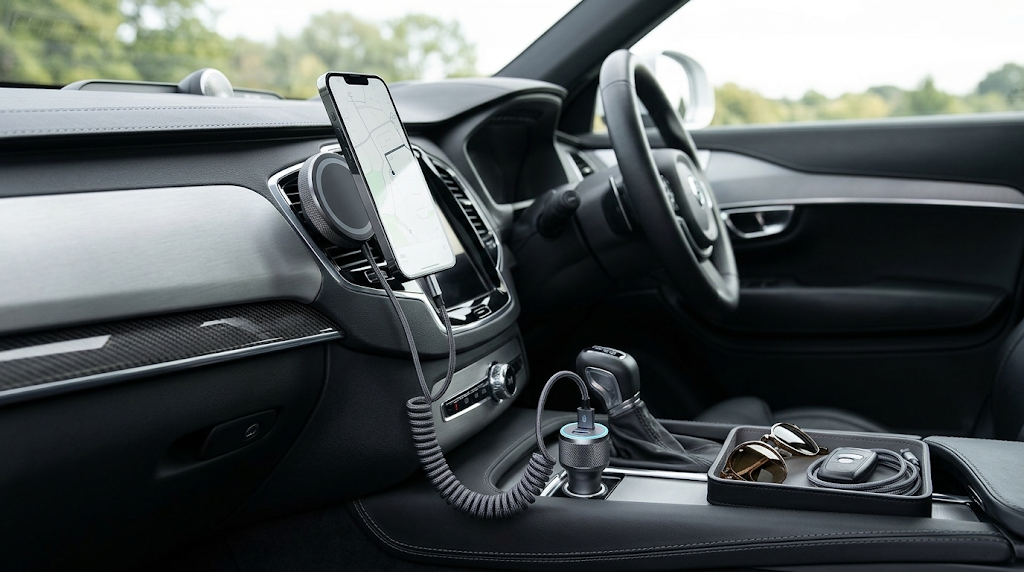
A useful car phone holder fits your phone, case and mounting location without getting in the way. Add a compatible charger and a sensibly routed cable, and you have a more organised setup—not permission to interact with your phone while driving.
If you are comparing a magnetic car phone holder in Pakistan, do not start with the strongest-looking magnet or a large charging-wattage claim. Check the whole installation while parked, including your dashboard, vents, phone case and power socket.
1. Choose a mounting position before choosing a mount
Look for a position that preserves the driver’s view and access to vehicle controls. Consult the vehicle and accessory instructions for suitable mounting locations and airbag keep-clear areas. A mount that suits one car’s dashboard or vent may not fit another.
Vent clips, suction bases and adhesive mounts solve different installation problems. Check the surface shape, vent design and permitted installation method before purchase. Do not assume that “universal” means every car and phone combination has been tested.
2. Check the phone and case together
For a clamp-style holder, check the opening range with the case fitted and confirm that the arms do not hold down buttons. For a magnetic holder, verify the phone-and-case compatibility statement. A printed ring on a cover is not proof of a suitable magnetic attachment.
Magnetic holding and wireless charging are separate capabilities. Belkin’s accessory troubleshooting guidance explains that compatibility can affect attachment and charging performance. Do not infer certification from a product photo.
3. Match the car charger to your phone
Confirm that the adapter suits the vehicle socket and the phone’s supported charging system. Check output protocols and the per-port rating, including the output available when two devices are connected. A combined two-port wattage is not automatically the power delivered to each port.
USB-C describes a connector; it does not, by itself, promise every fast-charging mode. If you want to understand USB-PD, cable ratings and why a higher-wattage adapter may not improve your result, read our slow-charging and fast-charger guide.
4. If the holder charges wirelessly, check the complete setup
A wireless charging mount still needs an appropriate power source. Confirm the supplied cable, required adapter and compatible phone/case combination before comparing charging speeds. A “15W” label alone is not a promise that every phone will receive 15W in the car.
Keep the phone out of direct sun where practical and follow the phone maker’s temperature guidance. Apple notes in its fast-charging guidance that very hot or cold conditions can affect fast charging. A warm cabin and active navigation are not the same conditions as an advertised laboratory charge test.
5. Route the cable and set navigation while parked
Choose a cable length that reaches the phone without hanging across vehicle controls or moving parts. A coiled or retractable design is not automatically the right solution; check its reach, connector fit and whether the route remains clear during normal seat and control adjustments.
Set your route before moving. If you need to change a setting or handle a charging problem, stop in an appropriate safe place first. The FMCSA’s distraction guidance recommends setting GPS before driving. A holder does not remove distraction; NHTSA includes interacting with navigation systems among activities that can divert attention from driving. These are general safety references, not a statement of Pakistan’s traffic laws.
Your pre-purchase checklist
- Phone model, case and complete device dimensions.
- Mount type and a vehicle-approved location.
- Magnetic or clamp compatibility with the case fitted.
- Charging protocol, cable and actual per-port output.
- A cable route that does not interfere with controls.
- Clear installation instructions and seller support.
Ask Bliss about current car accessory availability. Share your phone model, case and intended mounting location so we can help you check a specific item. Do not send private vehicle documents. The featured image is an illustration, not a claim that all pictured accessories are stocked.
Frequently asked questions
Does a magnetic car phone holder charge the phone?
Only if it includes a compatible wireless charging function and receives the required power. A magnetic attachment alone does not charge a phone.
Can I use the holder with a thick phone case?
Check the manufacturer’s limits for the specific holder and case. Test attachment while parked; do not rely on appearance or the word “universal”.
Can I use a wall charger in the car socket?
A vehicle accessory socket is not the same connection as a household mains outlet. Use an adapter designed for the vehicle’s power connection and follow both manufacturers’ instructions.
Keep exploring

USB-C Headphones Not Working? Check the Adapter and DAC
Troubleshoot USB-C headphones with compatibility checks, DAC adapter guidance and simple comparisons before replacing your headset or adapter.
Read the guide
How to Remove a Tight Phone Case Without Forcing It
Learn how to approach a tight phone case, distinguish flexible and layered designs, avoid forcing the phone and recognise when to stop.
Read the guide
Privacy vs Clear Screen Protector: Which Should You Choose?
Compare privacy and clear screen protectors, viewing angles, brightness and unlocking compatibility. Use a practical checklist before buying.
Read the guide
How Many Charges Does a 10,000mAh Power Bank Give?
Understand power-bank capacity with a clear Wh calculation. Compare 10,000mAh and 20,000mAh examples, charging losses and your daily needs.
Read the guide