
Bliss Guides
Screen Protector Bubbles at the Edges? Check Your Case First
Screen protector edges keep lifting? Check case pressure, dust and alignment, learn what to try safely, and know when a replacement makes more sense.
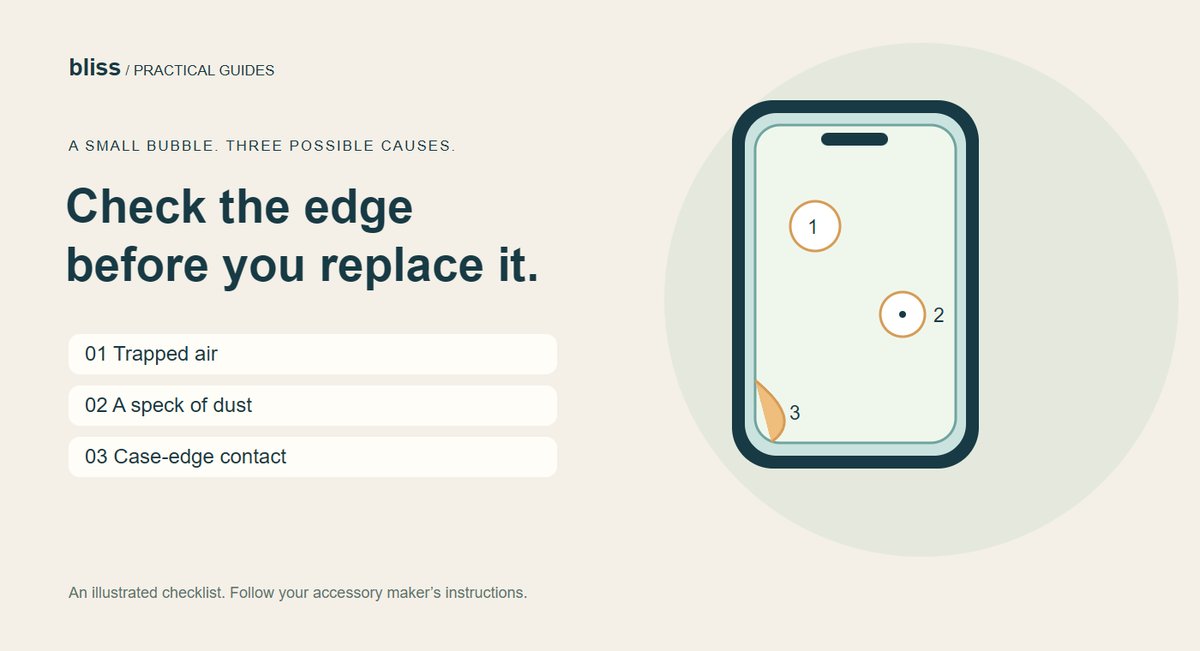
If your screen protector keeps bubbling at the edges, take the case off before buying another protector. A case can push against the glass or film and lift it again each time you smooth it down. Dust, poor alignment and damaged adhesive are other possibilities. The right fix depends on which problem you have.
It is frustrating to fit a new protector, get everything looking neat, and notice a little crescent returning in the corner. Start with a few gentle checks. Pressing harder is rarely a useful diagnosis.
Is it trapped air, dust or a lifting edge?
Look at the screen under a bright light with the display off. A clear pocket suggests trapped air; a visible speck suggests contamination. These are clues, not a guarantee that the adhesive can be repaired.
| What you notice | First check | Useful next step |
|---|---|---|
| A clear bubble away from the edge | Does your protector's installation guide allow gentle smoothing? | Follow its method with the supplied cloth or tool. |
| A bubble centred on a speck | Is there dust underneath? | Ask whether this protector can be lifted and reseated. |
| A corner lifts after fitting the case | Does the case lip touch the protector? | Remove the case and compare before replacing anything. |
| A white border that stays with the case off | Check alignment, model compatibility and adhesive condition. | Ask the installer or manufacturer to inspect it. |
How to check whether your phone case is causing bubbles
- Put the phone on a clean, stable surface and remove its case carefully.
- Photograph the lifted area so you can compare it later.
- Use only the smoothing method allowed by your protector's instructions.
- If the edge settles, refit the case gently and watch that same corner.
- If lifting returns where the case touches, stop repeatedly pressing it down. Check whether the case and protector are intended to work together.
This comparison is a practical way to narrow down the cause; it does not certify either accessory as defective. A protector placed slightly off-centre can conflict with a case that otherwise fits the phone correctly.
Belkin specifically includes removing the case as a check for persistent edge lifting in its Screen Skinz troubleshooting instructions. Those instructions apply to that product: do not assume every tempered-glass or film protector can be lifted in the same way.
What can you safely try at home?
Start with the installation guide that came with your protector. For example, Belkin's Titan SmartShield Pro application guide directs users to move small air bubbles toward the nearest edge with the cleaning cloth. A maker-approved gentle pass is different from scraping the screen with a hard card.
If dust is trapped underneath, pushing on the bubble will not remove the particle. Some products permit careful lifting and use of the supplied dust sticker; others are better handled by the installer. If you do not know which type you have, ask before peeling it up.
Do not add oil, household glue or water beneath an ordinary dry-apply protector. Avoid improvised heat from a hair dryer unless the exact product's official instructions expressly require it. A search result or short video is not an installation manual for your particular screen.
When is replacing the protector the better option?
Stop trying to rescue a protector with chipped edges, cracks, a crease or adhesive that no longer holds. Also pause if you cannot tell whether the damage is in the protector or the phone's display. Get it inspected before applying more pressure.
For a replacement, match the complete phone model and ask about clearance with your current case. “Edge-to-edge” describes coverage; it does not promise compatibility with every case lip. If someone installs it for you, take the case along and ask them to check the combination before you leave.
When browsing Bliss phone covers, confirm the model first and ask about your existing protector. A case photo alone cannot establish the gap around your particular glass. Our case materials guide covers the other everyday fit and handling checks.
Common questions
Will screen-protector bubbles disappear overnight?
Some small installation bubbles can settle, but not every bubble will. Belkin gives a 24–48-hour waiting period for small clear bubbles on Screen Skinz. Follow your own protector's timing; dust and case pressure need a different response.
Should I cut the protector to make room for my case?
Do not trim tempered glass or improvise a cut on an installed protector. Choose a compatible protector or case instead.
Does a bubble mean my phone screen is broken?
Not necessarily. A bubble can be in the adhesive layer above an intact display. Lines, cracks, touch problems or marks that remain unclear deserve an inspection rather than an assumption.
Prepared by Bliss with AI assistance; sources checked on 30 October 2026. This guide explains troubleshooting, not a hands-on test of every protector. The illustration is schematic and does not show a product sold by Bliss.
Keep exploring

USB-C Headphones Not Working? Check the Adapter and DAC
Troubleshoot USB-C headphones with compatibility checks, DAC adapter guidance and simple comparisons before replacing your headset or adapter.
Read the guide
How to Remove a Tight Phone Case Without Forcing It
Learn how to approach a tight phone case, distinguish flexible and layered designs, avoid forcing the phone and recognise when to stop.
Read the guide
Privacy vs Clear Screen Protector: Which Should You Choose?
Compare privacy and clear screen protectors, viewing angles, brightness and unlocking compatibility. Use a practical checklist before buying.
Read the guide
How Many Charges Does a 10,000mAh Power Bank Give?
Understand power-bank capacity with a clear Wh calculation. Compare 10,000mAh and 20,000mAh examples, charging losses and your daily needs.
Read the guide